An IPTV trial checklist turns a free 24 hours into a real decision. Most people waste their trial: they install the app on a phone at lunchtime, flick through a few channels on a perfect connection, see that it works, and pay for a year. Then the first busy weeknight arrives and they find out how the service actually behaves.
A trial is only useful if it reproduces the conditions you will really watch in: your television, your internet at its busiest, and the channels you actually care about. This IPTV trial checklist gives you ten things to test, the order to test them in, the red flags that should stop you paying, and how to judge the result honestly.
Why most IPTV trials tell you nothing
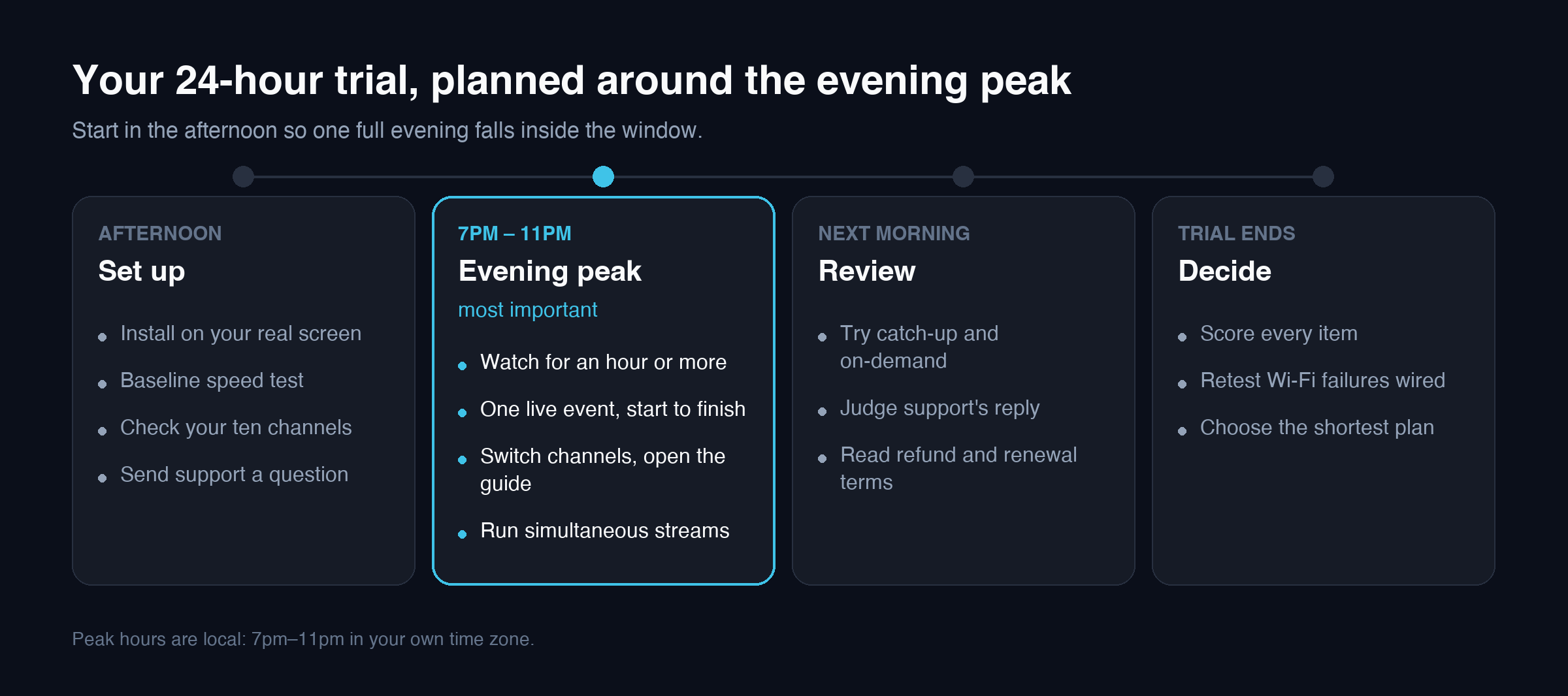
Streaming problems rarely show up in ideal conditions. A service that looks flawless on a phone at 1pm can buffer on a streaming stick at 9pm, because evening is when your household and your neighbourhood are all online at once. A trial run at the wrong time, on the wrong screen, answers a question you were never going to ask.
The other common mistake is testing whatever channels appear first. A long channel list tells you nothing about the ten channels your household actually watches. If those are missing, unreliable, or buried, the rest of the list does not matter.
So the rule behind every item on this IPTV trial checklist is simple: test the way you will use it, not the way that makes the trial easy.
Plan your 24 hours before you start
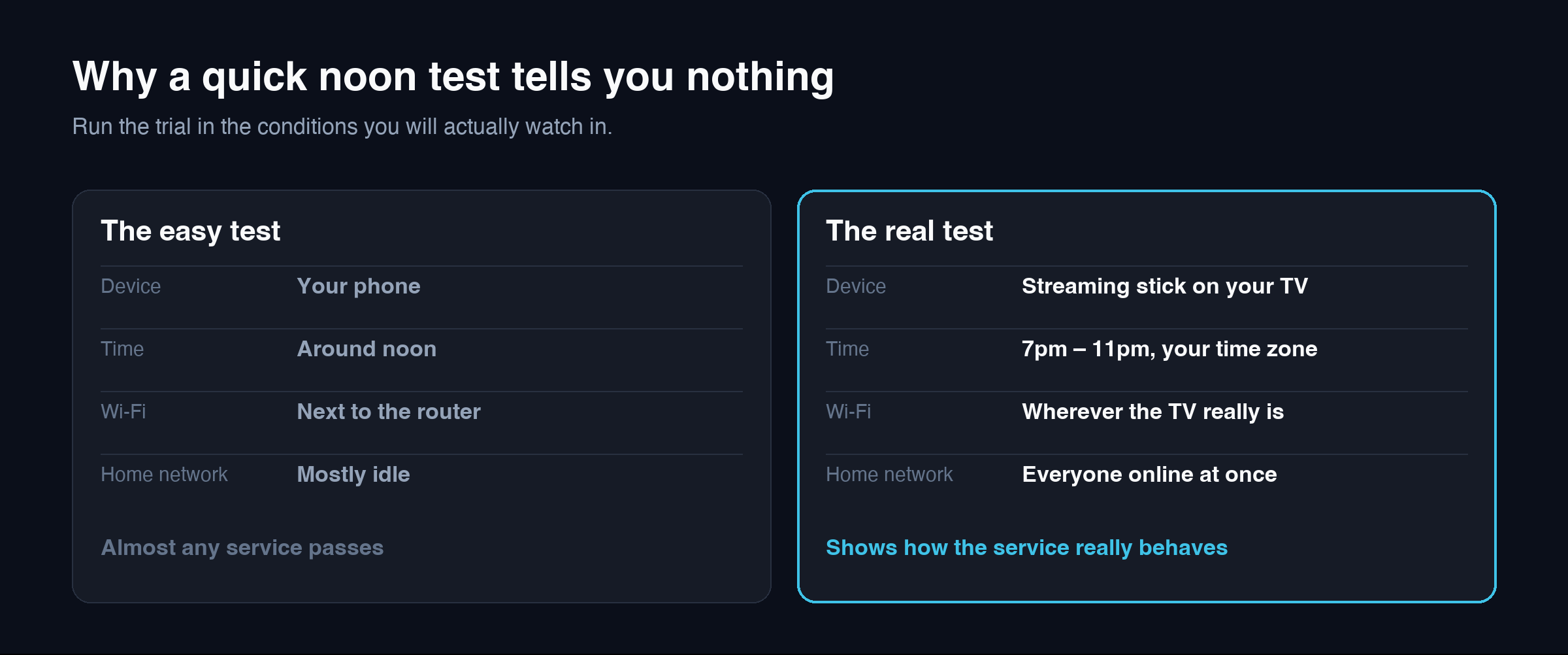
A 24-hour window goes quickly, and the most important test — your evening peak — only happens once inside it. Ten minutes of planning before you request the trial makes the difference.
- Write down ten channels your household watches most, including any in a second language.
- Choose the device you will actually use, and install the player app on it before the trial begins.
- Time the start so that at least one full evening, roughly 7pm to 11pm in your own time zone, falls inside the 24 hours. Starting in the afternoon usually works best.
- Check your calendar for a live event you would normally watch, so you can test one start to finish.
- Run a baseline speed test on the streaming device before the trial starts, once in the afternoon and once in the evening, so you already know what your connection delivers at each time.
With that ready, the IPTV trial checklist below fits comfortably into an afternoon, one evening and the following morning.
The IPTV trial checklist: 10 things to test
1. Test on the screen you will actually use
If you plan to watch on a living-room TV through a streaming stick, test there — not on your phone or laptop. Phones have fast processors and are usually close to the router. A streaming stick behind a television has neither advantage, and it is the device that will decide your experience.
Set the service up on that device using the matching guide, such as our Fire TV Stick setup guide or Smart TV setup guide, so you are testing the service rather than a rushed installation.
2. Test during your own peak hours
This is the single most important item on the IPTV trial checklist. Watch for at least an hour between roughly 7pm and 11pm local time, when home and neighbourhood networks are under the most pressure.
Before you start, run a speed test on the streaming device itself with Fast.com, which measures sustained download speed. If playback struggles, you then know whether your connection or the service is the weaker link. If you are on Wi-Fi, try the same channels over a wired connection before drawing conclusions.
3. Check the ten channels you actually watch
Go through your list one by one. For each channel, note whether it is present, whether it plays within a few seconds, and whether the picture quality is what you expect on your screen.
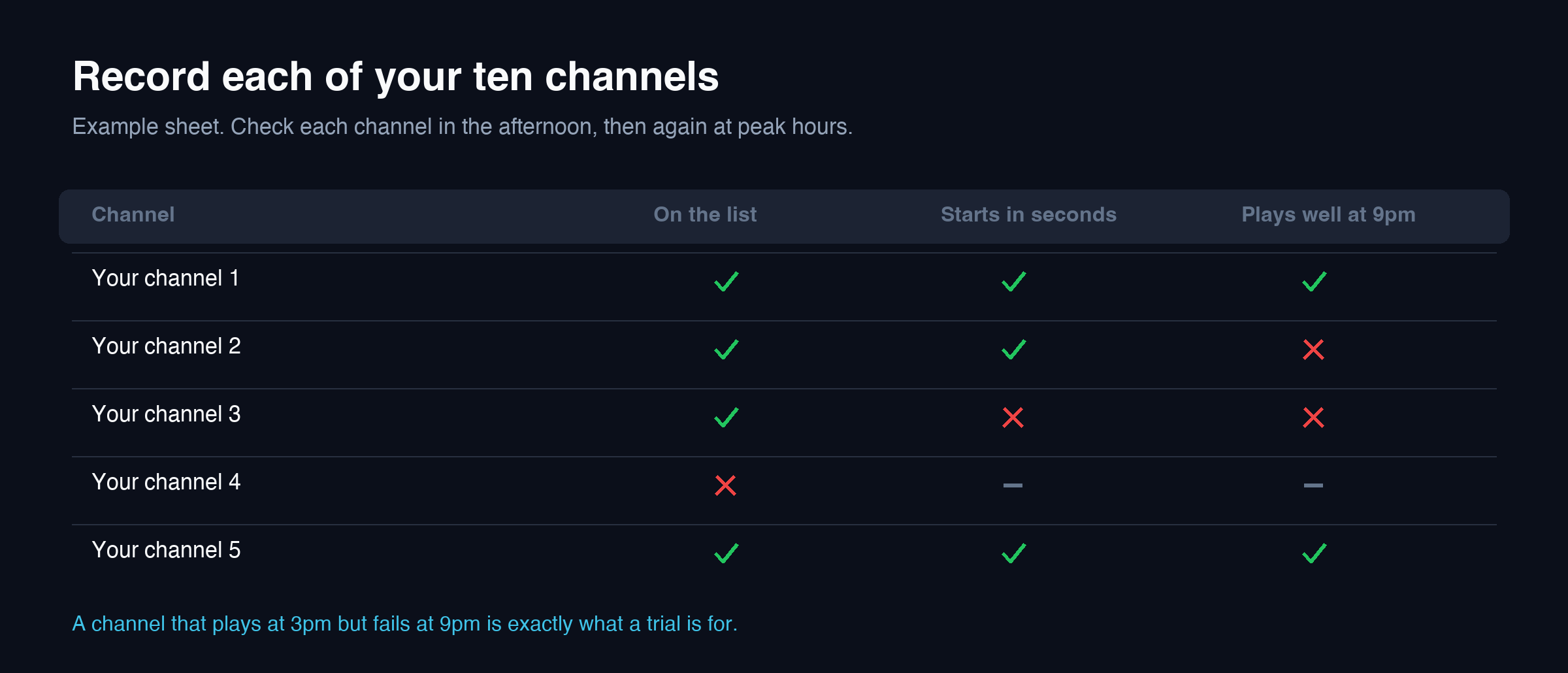
Test them at different times if you can, not just once. A channel that plays at 3pm and fails at 9pm is exactly the kind of problem a trial exists to catch.
4. Watch one live event from start to finish
Live events are the hardest test for any stream: large audiences, constant motion and no second chances. If there is a live event in your window that you would normally watch, watch it through rather than sampling a few minutes.
Note whether the stream holds steady during the busiest moments, and whether it recovers cleanly if it does stall. A service that is fine for films but falls apart during live events will disappoint anyone who subscribes mainly for live viewing.
5. Switch channels the way you normally would
Channel switching is something you do hundreds of times a week, so its speed matters more than it seems during a quick demo. Flick between channels the way you normally do and notice how long each takes to start playing.
A few seconds per switch is common for IPTV. Much longer, or frequent failures to load on the first try, becomes irritating very quickly in daily use.
6. Open the TV guide
Open the programme guide and check that it is populated for the channels on your list, and that the times match what is actually airing. A guide that is blank or shifted by a few hours is often a settings issue rather than a fault in the service, but you want to know it can be made to work before you pay.
Most players have a guide refresh option and a time-shift setting. Our TiviMate guide shows where those settings live.
7. Try catch-up and on-demand
If watching programmes after they air matters to your household, test it during the trial rather than assuming it works. Pick a channel you care about, go back to a programme from earlier in the day, and play it.
Do the same with on-demand films and series: search for a few titles you would genuinely watch. A large library is only useful if what you want is in it and plays reliably.
8. Test the connections your household needs
If more than one person will watch at the same time, find out how many simultaneous streams your intended plan allows, and test that number during the trial if the trial permits it. Two streams at 9pm put far more load on your connection than one stream at noon.
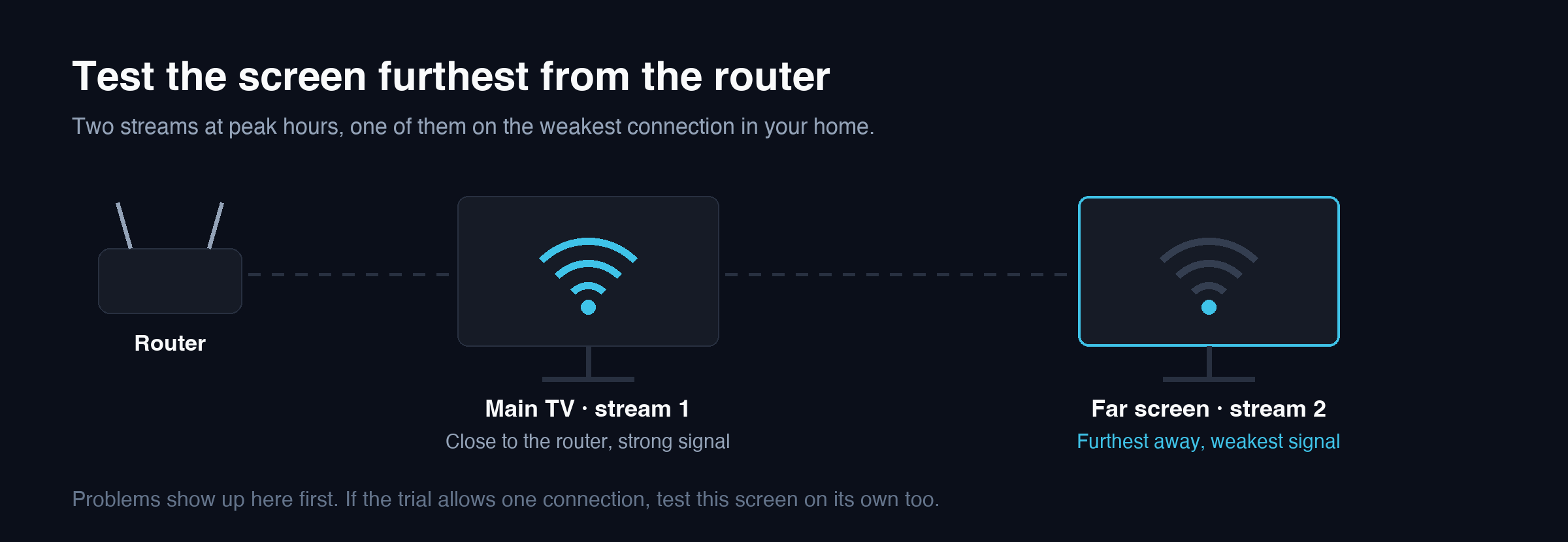
If the trial only allows one connection, still test at peak hours on your main screen, and confirm the connection limits in writing before choosing a plan. Our pricing page sets out what each plan includes.
9. Contact support with a real question
You will need support eventually, so test it while the stakes are low. Send a genuine question — how to set up a second device, or why a particular channel stalled — and note how long the reply takes and whether it actually answers what you asked.
A fast, specific reply during a trial is a good sign. Silence during a trial, when a provider has every reason to impress you, is a strong signal of what support will be like after you have paid.
10. Read the refund and renewal terms before paying
Before choosing a plan, read how refunds work and whether the subscription renews automatically. These terms decide what happens if the service stops suiting you in week three, which no trial can show you.
LeafIPTV subscriptions are prepaid in Canadian dollars and do not renew automatically. Our refund policy and payment policy are published in full, and any provider you consider should be able to point you to the same.
Questions to ask support during your trial
Item 9 on the IPTV trial checklist tests whether support replies. These questions test whether the answers are useful, and each one settles something the trial itself cannot show you:
- How many simultaneous connections does each plan include? This decides whether a second TV can watch at the same time.
- Which devices and apps do you support? Ask specifically about the device you plan to use.
- Is catch-up available, and for which channels? A general “yes” is less useful than knowing it covers the channels on your list.
- How do refunds work if the service stops suiting me? Ask for the written policy, not a verbal summary.
- Does the subscription renew automatically? Know before you pay, not when the next charge appears.
- How do I report a channel that stops working? The answer shows whether there is a real process behind the support address.
Clear, specific answers to all six are a better sign than a fast reply that avoids the question.
Red flags during an IPTV trial
Some results on your IPTV trial checklist should stop you paying, whatever the price. Treat these as warnings rather than minor issues:
- Buffering on a wired connection at peak hours across many channels, even though your speed test is healthy.
- Several of your ten channels missing or repeatedly offline during the trial.
- No reply from support within the trial window.
- Pressure to buy a long plan before your trial has even finished.
- No written refund or renewal terms, or terms that change when you ask about them.
- Promises that sound too good to be true, such as guaranteed zero buffering or every channel in the world.
The last point matters beyond streaming. Canada’s Competition Bureau explains how to recognise misleading marketing claims, and the Canadian Anti-Fraud Centre is where to report suspected scams. No honest provider can guarantee zero buffering, because much of what causes it happens on your own network.
How to judge the result of your trial
When the 24 hours are up, go back through the IPTV trial checklist and mark each item as a pass, a partial pass, or a fail. Writing it down stops one good evening, or one bad moment, from deciding for you.
| IPTV trial checklist item | When to test | Result |
|---|---|---|
| Your own screen and device | Afternoon, during setup | Pass / Partial / Fail |
| Evening peak hours | 7pm–11pm local time | Pass / Partial / Fail |
| Your ten channels | Afternoon and evening | Pass / Partial / Fail |
| One live event, start to finish | When it airs | Pass / Partial / Fail |
| Channel switching speed | Evening | Pass / Partial / Fail |
| TV guide | Evening | Pass / Partial / Fail |
| Catch-up and on-demand | Next morning | Pass / Partial / Fail |
| Simultaneous connections | Evening peak | Pass / Partial / Fail |
| Support reply | Send early; judge the reply | Pass / Partial / Fail |
| Refund and renewal terms | Before paying | Pass / Partial / Fail |
- If it failed only on Wi-Fi, retest over a wired connection before blaming the service. Our IPTV buffering guide explains how to tell the difference.
- If the channels you care about passed at peak hours, the service suits how you watch, even if some channels you never use did not.
- If support never replied, weigh that heavily. It is the part of the service a trial shows least and matters most later.
Keep the completed IPTV trial checklist. If you subscribe and something changes a few weeks later, it is a record of how the service performed on your connection when you tested it, which makes any conversation with support far quicker and more specific.
Even after a good trial, start with the shortest plan that makes sense for you. A month of real-world use tells you far more than 24 hours, and you can move to a longer plan once you are confident.
Testing for a household with more than one TV
A single stream on one television is the easiest thing a service can do, and the easiest IPTV trial checklist item to pass. If your household watches on two or three screens in the evening, a one-screen trial can pass while the real-world setup struggles.
Where the trial allows it, run two streams at the same time during your evening peak: one on the main TV and one on the screen furthest from the router. That second screen is the realistic weak point, because it combines a second stream with the weakest Wi-Fi signal in the home.
If the trial allows only one connection, test the far screen on its own at peak hours as well as the main one. You will at least know whether that location can hold a stream, which is the part most likely to fail once everyone is watching.
Testing in Canadian conditions
Where you live in Canada changes how you should run your IPTV trial checklist. Evening peak hours are local, so a trial that starts in the morning in Halifax and one that starts in the morning in Vancouver reach their peak at very different points in the 24 hours.
Live events scheduled on Eastern time start three hours earlier in local terms on the Pacific coast, which makes catch-up far more important there. And if your household watches in French, add French-language channels to your list of ten rather than judging the service on its English line-up alone.
IPTV trial checklist FAQ
How long does an IPTV trial need to be?
Twenty-four hours is enough to work through an IPTV trial checklist, provided the window includes at least one full evening peak, roughly 7pm to 11pm in your time zone. What matters is testing at the right time on the right screen, not the length of the trial.
What should I test first during an IPTV trial?
Set the service up on the screen you will actually use, then test it during your own evening peak hours. Those two items reveal more than everything else on the IPTV trial checklist combined.
Do I need a VPN to test IPTV?
No. Test without one first so you see how the service behaves on your normal connection. A VPN can help in specific situations, but it also adds overhead that can make streaming worse, so adding one during a trial makes the result harder to read.
Can I test IPTV on more than one device?
That depends on the trial’s connection limit. If it allows only one connection, test on your main screen at peak hours, and confirm how many simultaneous streams your intended plan includes before paying.
What if the trial works but I am still unsure?
Even when every item on your IPTV trial checklist passes, choose the shortest plan that suits you rather than committing to a year. A month of everyday use across weeknights and weekends is the most reliable test of all.
Make the 24 hours count
A trial is short, and its value comes entirely from how you use it. Plan the window around your evening peak, test on your real screen with your real channels, contact support once, and read the terms before you pay.
Run through this IPTV trial checklist and you will know within a day whether a service suits your household. When you are ready, you can request a 24-hour LeafIPTV trial and put it to exactly this test.